Let me promise you; there is a perfect MIDI controller out there for you. But if you’re rifling through the seemingly millions of different brands, models, styles, and more, musicians can often feel forced to comply with MIDI keyboards they only think are “good enough.”
But let me tell you again, I promise you there is the perfect MIDI controller for you. So let’s find out if Arturia’s latest budget keyboard is ideal for you in this review.
Learn more about this MIDI keyboard while helping support our team through our partnership with Sweetwater by clicking here.
What Is The Arturia MiniLab 3?
Arturia has long staked its reputation on creating well-designed software, synths, and controllers that producers of every level want to use (instead of niche-market hardware only synth nerds geek out on). As such, everything they bring to market accomplishes this goal in its own way.
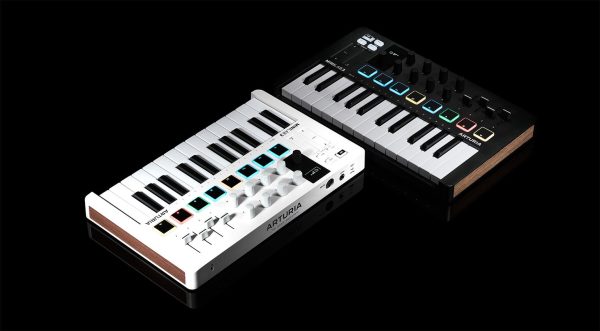
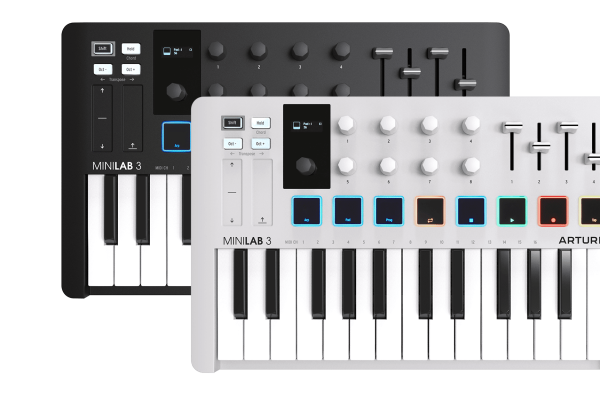
The Arturia MiniLab 3 continues the company’s legacy by offering a budget MIDI controller with a 25-key arrangement complete with a slender profile and lightweight design. On top of that, the controller comes with touch-sensitive pads, rotary encoders, clickable browsing knobs, and an ergonomic form that allows easy modulation of the device’s pitch and modulation control.
In short, this thing packs a ton of functionality into a travel-friendly keyboard that integrates almost instantly with all of the most popular DAWs.
Whom Is The Arturia MiniLab 3 Made For?
Now, I doubt there will ever be a MIDI controller or keyboard with a $109 price point that is perfect for every producer at every level. No, this keyboard is designed and targeted, at least in my opinion, to a handful of select music producers.
So let’s dive into whom I think this keyboard is perfect for.
Beginner Producers and Musicians.
This keyboard does many different things and packs a ton of functionality into a tiny device. This arms beginner producers with everything they need to modulate parameters in real-time, start experimenting with sound design via Analog Labs, and more.
But there is no way it can compete with the more robust features of more pro-level MIDI keyboards. The size alone was a restriction for me, who is used to a complete set of keys to play my melodies.
That being said, its size is still one of its best qualities, as I will now explain…
On-The-Go-Producers
This keyboard does a lot with only a tiny space, making it an ideal option for traveling producers. It slots easily into a backpack even, as I did when walking across town to get some work done at a local cafe.
It needs few cables and is bus powered, meaning it’s low-maintenance and user-friendly, which is just what you need when you have more important things to worry about like catching a flight or crossing a street.
What I Liked About The Arturia MiniLab 3
Here are a few standout features that impressed me about this MIDI keyboard right out of the gate.
Automapping To Ableton
When I plugged this thing into Ableton, I was shocked that it instantly recognized all Macro controls on my instrument and effect racks. It also adequately displayed the plugin and the device’s parameter integer (Hz, frequency, and MIDI value) on the onboard display panel. Better yet, it did this all without any complicated routing. My first MIDI controller was the AKAI MPK25, whose rotary knobs had to be custom assigned each time, which made me incredibly envious of producers just getting into production who have access to such unique and user-friendly features like this.
Another excellent feature was that the four faders, while in session view, could instantly control the volume, the A and B sends, and the panning! I was super impressed by that; it allows producers to use this controller to give them an out-of-the-box feel to their workflows.
Deep Control Over Analog Lab
Analog Lab is Arturia’s in-depth and comprehensive bank of sounds and presets. This MIDI keyboard almost feels as if it was specifically built to allow producers to get the most out of this plugin. Deep integration will enable you to scroll through presets, shape quickly and sculpts the sounds you find, and promptly modulate multiple parameters in real-time. It’s a sound designer’s dream, and they were nice enough to give you the entry-level version of Analog Lab upon purchase of the keyboard.
Powerful Chords And Arps
While this thing won’t rival that of the arps found on Moog hardware or anything, it does pack a ton of functionality into a small and affordable device.
The arp lets you control the swing and timing adjustments of the chords you hold, a feature not often seen in many MIDI controllers.
The chord feature also allows you to easily assign more complex chord structures to be played at the stroke of a single key.
What I Didn’t Like About The Arturia MiniLab 3
Here are a few features that I wasn’t too crazy about after spending a few studio sessions toying around with this keyboard. Sure, they aren’t total dealbreakers for me, as this keyboard is one of the more affordable options on the market, but they were worth noting.
No Repeat Button
Every other MIDI keyboard I have owned previously had a note repeat button that you could set to repeat held notes at different integers. But the MiniLab 3 was missing this feature.
This feature is clutch for making hi-hat rolls, snare rolls, and trance-friendly leads, and I was a bit shocked to see that it was absent here. There were a few workarounds that I discovered using the features of the arp and such, but it was worth mentioning.
It Serves A Specific Purpose
I’ll be straight up when I say that as fun as thing keyboard was to get familiar with, I don’t see myself using it again unless I’m producing on the road. And seeing as I have a newborn in the house at the time of writing this review, I don’t think that will be happening anytime soon).
Because at the end of the day, I still feel like this is a perfect beginner keyboard – but it cannot replace the higher-end controllers and keyboards I have fondly included in my current studio setup. I love weighted keys and a full-length piano for producing, and this MIDI keyboard didn’t offer that.
But I will reiterate my above sentiment by saying that I’m envious of the producers just starting today because ten years ago would have killed for what this thing packs into such a small design and price.
Specs On The Arturia MiniLab 3
Type: Keyboard Controller
Number of Keys: 25
Type of Keys: Synth
Velocity Sensitive: Yes
Pads: 8 x RGB Back-lit Pressure Sensitive Pads
Other Controllers: Pitchbend/Modulation Capacitive Touch Sensors
Encoders/Pots: 8
Faders: 4
Pedal Inputs: 1 x 1/4″ (control)
MIDI I/O: Out/USB
USB: 1 x USB-C
Computer Connectivity: USB
Power Supply: USB bus powered
Height: 2.0″
Width: 14.0″
Depth: 8.7″
Weight: 3.3 lbs.
Manufacturer Part Number: Minilab3
Purchase this keyboard here and help support our team via our partnership with Sweetwater.

Will Vance is a professional music producer who has been involved in the industry for the better part of a decade and has been the managing editor at Magnetic Magazine since mid-2022. In that time period, he has published thousands of articles on music production, industry think pieces and educational articles about the music industry. Over the last decade as a professional music producer, Will Vance has also ran multiple successful and highly respected record labels in the industry, including Where The Heart Is Records as well as having launched a new label with a focus on community through Magnetic Magazine. When not running these labels or producing his own music, Vance is likely writing for other top industry sites like Waves or the Hyperbits Masterclass or working on his upcoming book on mindfulness in music production. On the rare chance he's not thinking about music production, he's probably running a game of Dungeons and Dragons with his friends which he has been the dungeon master for for many years.