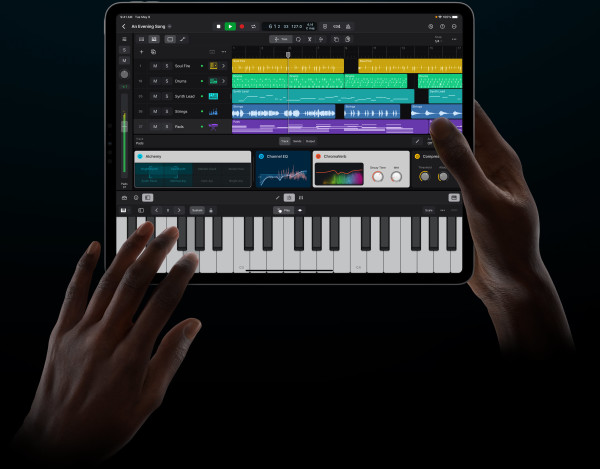
Logic Pro is undoubtedly one of the world’s most popular DAWs, being a favorite amongst many people, surpassing the niche specialties of Ableton Live for Electronic music or Pro Tools for engineering. The iPad has gained more and more power since Apple split off iOS into iOS for iPhones (and the now defunct iPod) and iPadOS for iPads. With the addition of M1 and now M2 chips on the iPad Air and Pro, these are the most powerful devices in their segments. Couple that with up to 16GB of RAM and Thunderbolt connectivity on the Pro, and you’re looking at seriously pro-level performance. The specs and hardware for Logic to run on the iPad are there, but it’s the software I’m not convinced about.
I should preface this by saying I’m a die-hard Logic fan. After being plagued with fatal and unresolved crashes in Ableton Live, I switched my workflow to Logic and haven’t looked back since. That being said, it isn’t perfect, as it has its own minor glitches with automation and Flex Time. But for me, Logic is more logical (no pun intended) and more effectively organized. The mixer and sends are much easier to use than most of the competition, and the built-in virtual instruments and effects are top-notch. As a matter of fact, the Alchemy synth is my go-to for everything–on every track.
I also have nothing against the iPad. I own one. I love the flexibility of interacting with media with touch and then syncing it to your Mac to do adjustments or edits that are easier done with a mouse, keyboard, and maybe external hardware. The power and integration with the Apple ecosystem are mindblowing, and I even use the Logic Remote app on my iPad, because some things can be convenient to have on a touch surface or off to the side without needing a whole other display.
Logic Remote
I’ll start by addressing Logic in its current form on iPadOS – the Logic Remote app. Having a touch-enabled surface to do EQ or pad effects adjustments on is really useful, especially being able to quickly adjust things without having to hunt through plug-in windows on your primary display (side note – only stock plug-ins can be used with Logic Remote). Touch manipulation with some of Apple’s cleverly designed input methods and virtual keyboards borrowed from GarageBand is unchallenged. Even having the mixer with its volume faders and sends is very nice as far as not having to switch your workspace on your primary display.

Based on the information we have so far, Logic Pro for iPad seems to just be a stand-alone version of Logic Remote with the addition of an arrangement view, and if you already own Logic Pro on macOS, there’s no reason to abandon it, since all of the touch features from the standalone app are already available for free in the Remote app. The only feature I can discern that could be cool is drawing in automation with the Apple Pencil, which has been a highlight in Apple’s promotion of the app.
Third-party plug-ins
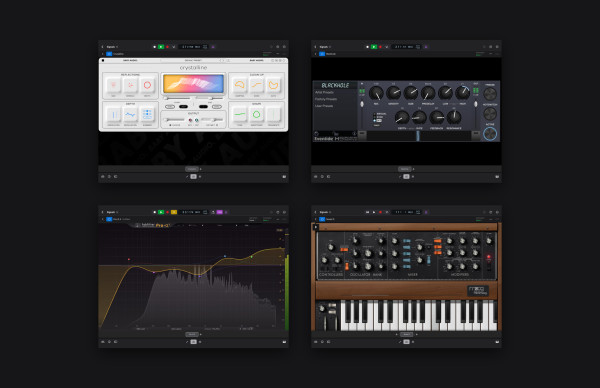
A number of third-party plug-ins are already available in the form of Apple Silicon-compatible standalone apps on the Mac App Store, such as the Moog Model D and Model 15. Upon installation of the standalone apps, Audio Units are installed into the component folder which are then available for use in Logic and other DAWs that support AU plug-ins. The vast majority of plug-ins, however, including a number of industry standards, rely on dedicated installers from their respective manufacturers being downloaded from their respective websites, and that’s something the iPad (and the iPhone for that matter) don’t support.
I should also mention that my experience with the aforementioned Moog apps has been a headache at best, and painful at worst. They are riddled with automation glitches that distort the sound when adjusting parameters, and will randomly crash and freeze. Even worse, I could not get any App Store-sourced Audio Units to run in Ableton Live, as loading one onto a track and attempting to open the plug-in window would present me with an Ableton error that says the plug-in could not be loaded.

Apple has confirmed, however, AUs from standalone App Store instruments will be supported, but that means there will be no major-name plugins, including the likes of FabFilter, Serum, or any third-party effects whatsoever, which is a huge loss and turn-off from Logic for the iPad.
Edit: After I wrote this section of the article, Apple updated their Logic Pro for iPad webpage, including effects plug-ins from the likes of FabFilter. However, the selection of Audio Units available via the App Store is still significantly more limited, and from my own experience, I know the reliability of App Store-supplied Audio Units is basically non-existent. Contacting Logic Pro support directed me to developer support for each plug-in, and when I contacted Moog for help with that plug-in, I never got a response. That was almost a year ago, and the issues still have not been resolved.
Dolby Atmos
One of the most attractive offers of Logic Pro for macOS is a fully-integrated, no-hassle, and all-included-for-the-price Dolby Atmos workflow for mixing your tracks. As an independent artist without a huge team or tons of resources, having the ability to make mixes in this exciting and groundbreaking new format is attractive for Logic.
The iPad has the hardware required for such a feat, with plenty of processing power, and Thunderbolt connectivity that could connect to a multi-channel interface powering an Atmos-enabled monitoring system. However, there is no mention of Atmos support, so I’m not expecting the iPad version to ship with that feature.

Hardware value
More of us have computers than tablets, although some of us only have tablets like the iPad. However, to take advantage of many of Logic’s features, you need a mouse, keyboard, and some extra RAM. The iPad Pro can be had with up to 16GB of ram which is included if you choose a storage configuration of 1TB or greater, but by the time you make that upgrade and add in peripherals, such as the pencil (which enables what would be the stand-out feature of Logic on iPad), keyboard, trackpad/mouse (if the keyboard doesn’t have one built-in), you’re looking at mid-spec MacBook Air pricing, which is going to give you a lot more flexibility for the other apps you can run, as well as plug-ins.
Although the iPad Air and Pro and MacBook Air and 13-inch Pro share the same offer of SoCs (systems on chip), the flexibility to configure the Macs is far greater than that of the iPads, which means more value and is really important to most. And let’s be honest here: with tons of parameters for different instruments and effects, it’s a lot easier to have small icons packed together you can click on and drag, versus a layout where you need to accommodate large enough touch zones on a screen. Last but not least, while the iPads do have great connectivity options via docks and hubs, any hardware that requires dedicated drivers is a no-go, meaning your selection of options will be somewhat limited. For many of us, this won’t be an issue, but it’s still worth noting for any owners of any niche gear.
Subscription pricing (really, Apple?!?!)
A major gripe I have with Logic (and Final Cut for that matter) coming to the iPad is the subscription pricing model. The pricing is actually very reasonable, at only $4.99/month or $49/year (prices are correct at the time of writing). That being said, one of the things that’s consuming our lives is the subscription model. Especially since I already own Logic for macOS, I’m not tempted to shell out more dough for a half-baked attempt at something that can’t replace my Mac.
Final thoughts
I will be curious to see how Apple might overcome the hurdles they’ve set themselves. Bringing Logic to the iPad may make it more accessible to some, especially in environments where tablets can be king (think education). I am waiting to evaluate how the projects will go back and forth between Mac and iPad since Apple has promised cross-compatibility with both OSes, although most third-party plug-ins will be lacking.
I think this is an interesting step, but the lack of major features and disappointing execution don’t have me thrilled to ditch the MacBook Pro that’s been driving my productions. Yet to be seen is if Apple will be able to bring these missing features to the iPad.









![How It Was Made: Low Steppa & Roel – Dreamliner [Low Trax]](https://magneticmag.com/wp-content/uploads/2026/09/DSC07195-1024x608.jpg)