A producer’s DAW (Digital Audio Workstation) soon becomes an extension of their hand, mind, and creativity. Once familiar with your DAW, working within it becomes muscle memory, allowing you to easily maneuver its different features and menus. But with that, and with each other DAW, comes choices, pros, and cons. Because every DAW has its own way of doing things, and just because one producer thrives in one DAW doesn’t mean that their friend, new to production, will find the same success.
This is why we have compiled a list of all of the top DAWs in the music production space right now and outlined the pros and cons of each so that you can better decide which DAW is the right one to commit to throughout your production journey.
Already have a few years of experience under your belt? That’s fine!
This list of the top, industry-standard DAWs will outline why each DAW has earned its place so that if you think it’s time for a slight change of scenery, you can make a better-educated decision about which DAW to migrate to. So let’s dive in…
https://www.youtube.com/watch?v=o1HhuYDdbJw
Ableton Live

Ableton Live is a versatile and powerful Digital Audio Workstation (DAW) for music producers and live performers. Its intuitive interface boasts a seamless workflow, making navigation a breeze. The unique Session View encourages experimentation with loops and samples, while the Arrangement View caters to traditional linear editing. Furthermore, Ableton Live’s extensive library of built-in sounds, instruments, and effects can accommodate various music genres and production styles.
Despite its many advantages, Ableton Live has a few drawbacks that might dissuade newcomers. The vast array of features can overwhelm beginners, presenting a steep learning curve. Additionally, the software’s price tag is relatively higher than other DAWs on the market, posing potential budgetary concerns. Lastly, with a focus on electronic music production and live performance, Ableton Live may not be the most suitable option for those primarily interested in audio recording or other genres.
Ableton Live is a feature-rich DAW that excels in electronic music production and live performance. While it might not be ideal for those just starting out or on a tight budget, its unique features and versatility make it a solid contender in digital audio workstations. As one entry in a list of the best DAWs of 2023, it’s worth considering for those who want a robust and creative production tool.
Learn More About It Here
Avid Pro Tools
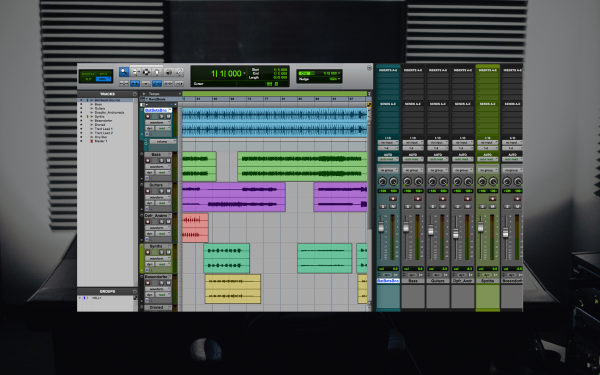
Avid’s Pro Tools has long been an industry standard for professional recording studios, making it a heavyweight contender in Digital Audio Workstations (DAWs). One of its most significant advantages is its robust audio editing capabilities, which makes it a top choice for those focusing on recording, mixing, and mastering. Pro Tools is also known for its seamless collaboration features, allowing producers to work with artists and engineers remotely, streamlining the music production process.
However, Pro Tools has some downsides that may give new producers pause. While powerful, the software’s interface can be daunting for beginners and has a steeper learning curve than other DAWs. Additionally, Pro Tools requires an iLok USB dongle or iLok Cloud account for software authorization, which might be a hassle for some users. Lastly, its pricing model includes a subscription plan, making it potentially more expensive in the long run compared to DAWs with a one-time purchase option.
In a nutshell, Pro Tools is a powerful DAW with unmatched audio editing capabilities, making it an excellent choice for those who prioritize recording, mixing, and mastering. While it may not be the most beginner-friendly option, its industry-standard status and collaboration features could make it a worthy investment for those looking to level up their music production game. If you’re a new producer considering Pro Tools, carefully weigh the pros and cons to determine if it fits your needs and goals.
Learn More About It Here
Apple Logic Pro
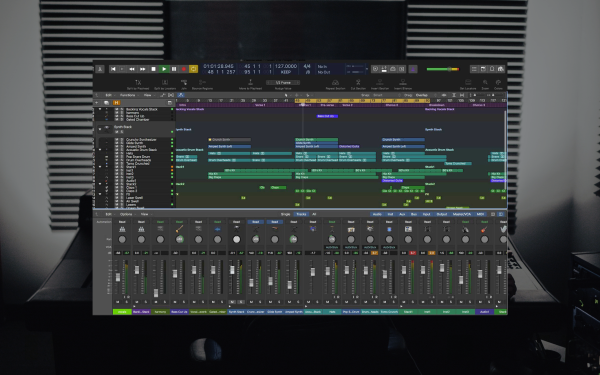
Apple’s Logic Pro X has been a fan favorite among music producers, offering a comprehensive suite of tools for creating, editing, and mixing audio. As a powerful Digital Audio Workstation (DAW), Logic Pro X boasts a vast library of high-quality sounds, instruments, and effects, giving you plenty of options to craft your masterpiece. Its seamless integration with the Apple ecosystem makes it a no-brainer for Mac users. At the same time, its Smart Tempo feature and Flex Time editing capabilities allow for precise control over your projects.
Despite its many advantages, Logic Pro X has a few drawbacks. The most significant limitation is its exclusivity to the macOS platform, which leaves PC users out in the cold. Additionally, while it has an extensive set of built-in plugins, Logic Pro X may not support all third-party plugins, which could be a deal-breaker for some producers.
Logic Pro X is a feature-packed DAW that caters to a wide range of music production needs. Its compatibility with macOS, extensive sound library, and advanced editing capabilities make it a solid choice for producers, especially those already invested in the Apple ecosystem. While platform exclusivity and potential plugin compatibility issues may concern some, Logic Pro X remains a top contender for anyone looking to create high-quality music on a Mac.
Learn More About It Here
Cakewalk by BandLab
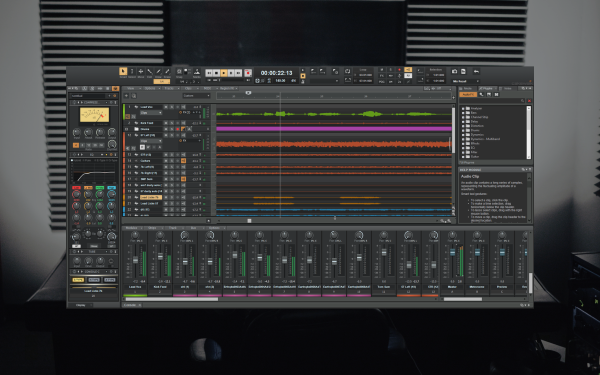
Cakewalk by BandLab is a powerful Digital Audio Workstation (DAW) that has been making waves in the music production world thanks to its feature-rich offerings and unbeatable price tag: free! Boasting a comprehensive suite of virtual instruments, effects, and editing tools, Cakewalk provides everything you need to create killer tracks without breaking the bank. Its Skylight interface is fully customizable, allowing you to tailor your workspace to your preferences, and the ProChannel feature offers top-notch mixing and mastering capabilities.
However, Cakewalk by BandLab is not without its downsides. One notable limitation is that it’s currently available only for Windows, leaving Mac users out of the loop. Additionally, some users have reported occasional stability issues and crashes, which can cause concern when working on complex projects. Lastly, Cakewalk has a solid selection of built-in plugins and instruments, but the quality may not be on par with those in premium, paid DAWs.
In a nutshell, Cakewalk by BandLab is an impressive DAW that packs a punch, especially considering its free status. It offers various tools and features catering to new and experienced producers. Though platform exclusivity and potential stability issues might be drawbacks for some, Cakewalk is a fantastic option for those on a budget or just starting in music production. Give it a shot, and you might find it’s the perfect tool to fuel your creative endeavors.
Learn More About It Here
Steinberg Cubase
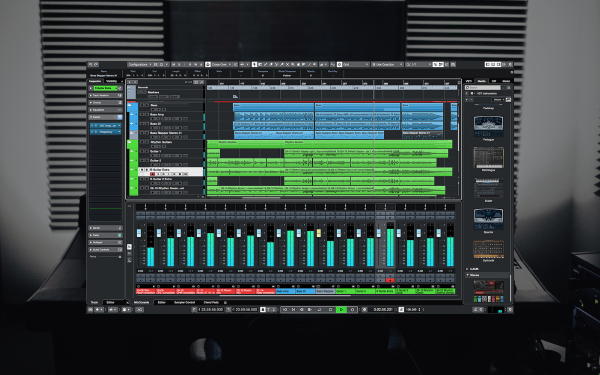
Steinberg’s Cubase is a versatile Digital Audio Workstation (DAW) that has earned its place among music producers and composers. With advanced features such as the Chord Track, MIDI Retrospective Recording, and VariAudio, Cubase enables creators to take their music to new heights. The DAW is also renowned for its powerful audio engine and pristine sound quality, making it an excellent choice for those focused on recording, mixing, and mastering.
However, Cubase does come with a few potential hindrances. One significant issue is its software licensing system, which requires a USB eLicenser dongle. This can be cumbersome for some users and limits the ease of use on multiple computers. Additionally, while Cubase offers a wide range of built-in instruments and effects, it might not cater to every genre or style out of the box, leading to the need for third-party plugins.
Cubase is a feature-rich DAW that appeals to many music producers and composers. Its advanced capabilities and high-quality audio engine make it a strong contender in digital audio workstations. While the eLicenser system and potential limitations in genre-specific tools might deter some users, Cubase is still a fantastic option for those looking to push the boundaries of their music production. Give it a spin, and you might find it’s the perfect tool to help you create your next masterpiece.
Learn More About It Here
PreSonus Studio One
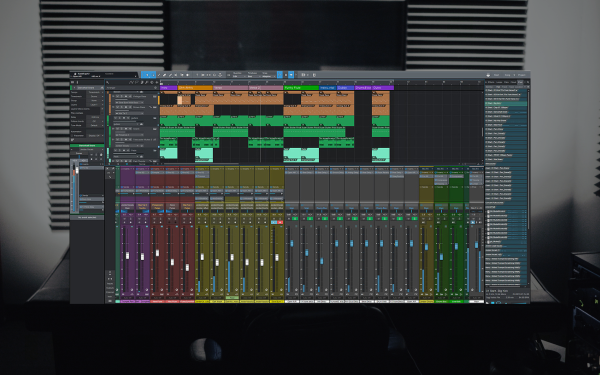
PreSonus Studio One has emerged as a robust Digital Audio Workstation (DAW) that caters to a diverse range of music producers. With a sleek, single-window interface and drag-and-drop functionality, Studio One makes staying organized and focused on your creative process easy. Its innovative features, such as the Arranger Track and Scratch Pads, streamline songwriting and arrangement, while the integrated mastering suite ensures your tracks sound polished and professional.
On the other hand, Studio One has a few bottlenecks. Although it boasts a sizable library of built-in instruments and effects, some users may find them lacking variety or quality compared to other DAWs. Additionally, while the software’s interface is generally user-friendly, the learning curve might be steeper for those transitioning from other DAWs due to the unique workflow Studio One offers.
In a nutshell, PreSonus Studio One is a powerful DAW that brings a fresh perspective to music production with its innovative features and user-friendly interface. While the built-in instruments and effects may not cater to everyone’s taste, Studio One remains a strong choice for new and experienced producers seeking a streamlined, efficient workflow. If you’re searching for a DAW that combines simplicity with cutting-edge tools, Studio One might be the perfect fit for your music production journey.
Learn More About It Here
Cockos Reaper 6
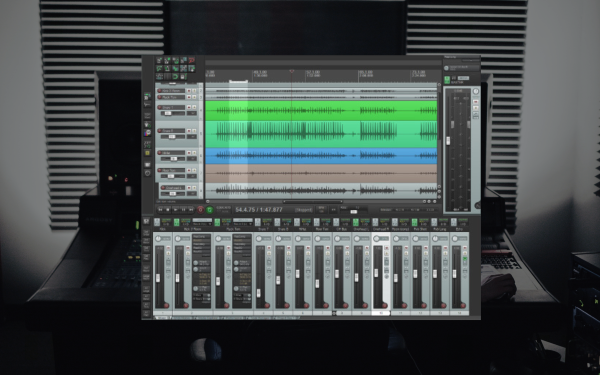
Cockos Reaper is a lightweight, powerful Digital Audio Workstation (DAW) that has quickly become a favorite among music producers for its flexibility and affordability. With a customizable interface and an extensive range of features, Reaper caters to various production styles and workflows. Its low CPU footprint means it runs smoothly on most systems, and its affordable licensing options make it an attractive choice for those on a budget.
However, Reaper does come with a few cons to consider. One main impediment is the lack of built-in virtual instruments, so producers must invest in third-party plugins to supplement their sound libraries. Additionally, while the software is highly customizable, this flexibility can make it more challenging for beginners to learn and navigate the DAW, especially compared to other, more user-friendly options.
In summary, Reaper is an impressive DAW that offers a versatile, robust platform for music production at an attractive price point. While the lack of built-in instruments and the initial learning curve may be drawbacks for some, its flexibility and performance capabilities make it a compelling choice for both new and experienced producers. If you’re willing to invest the time to learn its ins and outs, Reaper could be the perfect tool to fuel your creativity and elevate your music production game.
Learn More About It Here
Reason Studios Reason

Reason Studios’ Reason is a versatile Digital Audio Workstation (DAW) that has captivated music producers with its unique rack-based interface and virtual studio environment. This immersive setup encourages experimentation and fosters creativity, making it an inspiring choice for those who want to dive deep into sound design. Reason comes with a wealth of built-in instruments and effects, which can be endlessly patched and manipulated to create a wide array of sounds.
However, there are a few cons to consider with Reason. One constraint is its relatively closed ecosystem, making integrating with other DAWs or collaborating with fellow producers using different software is challenging. Additionally, while Reason offers support for VST plugins, the integration might not be as seamless as in some other DAWs, potentially limiting your access to third-party instruments and effects.
Reason is a highly creative and inspiring DAW that offers a unique approach to music production through its rack-based virtual studio environment. While its closed ecosystem and VST integration may present some challenges, the wealth of built-in instruments and effects, coupled with its immersive interface, make it an attractive choice for producers who value experimentation and sound design. The reason could be the perfect fit if you want to break free from traditional DAW workflows and embrace a more exploratory approach to music production.
Learn More About It Here
Image-Line FL Studio
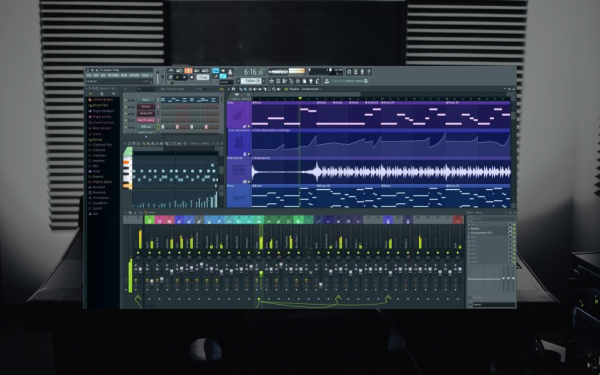
Image-Line’s FL Studio has been producers’ go-to Digital Audio Workstation (DAW), especially those in the electronic and hip-hop scenes. Known for its user-friendly interface, FL Studio makes it easy for newcomers to dive into music production. Its Piano Roll feature is one of the best in the business, simplifying MIDI programming and editing. On top of that, the DAW comes with a vast selection of plugins, synths, and samples, giving you all the tools needed to create some sick beats right out of the box.
On the flip side, FL Studio isn’t without its drawbacks. Some users find the interface cluttered, making navigating challenging as projects grow in size and complexity. Additionally, the DAW’s mixer is limited in terms of customization, which could be a deal-breaker for those who require more flexibility. Lastly, while FL Studio is available on both PC and Mac, some users argue that its performance is slightly better optimized for Windows.
FL Studio is a solid choice for producers looking to get into the game, especially those focusing on electronic or hip-hop music. It’s beginner-friendly and packed with features to keep your creative juices flowing. Offering an outstanding balance of accessibility and functionality, FL Studio is worth considering. Remember the potential limitations; you’ll be cooking up fire tracks quickly.
Learn More About It Here
Bitwig Studio
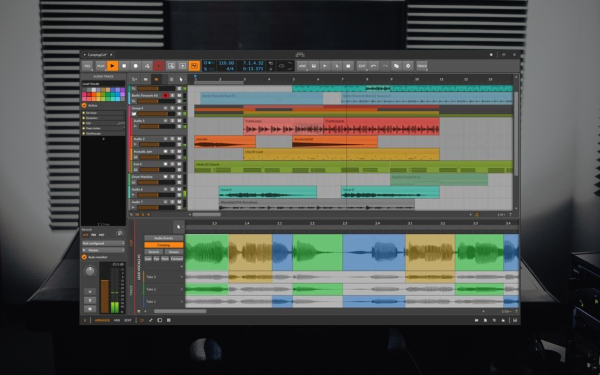
Bitwig Studio has emerged as a cutting-edge Digital Audio Workstation (DAW) that offers a fresh and innovative approach to music production. Known for its modular design, Bitwig allows producers to create custom devices and signal chains easily. Its unique features, such as the Grid and Clip Launcher, enable producers to explore new creative avenues and workflows. Bitwig Studio also boasts impressive MIDI Polyphonic Expression (MPE) support, making it an excellent choice for those looking to work with expressive controllers.
Despite its many strengths, Bitwig Studio does have a few drawbacks. While robust, its built-in instrument and effect library might not be as extensive as those found in some DAWs. This could lead some producers to seek additional third-party plugins to fill the gaps. Additionally, Bitwig Studio’s innovative approach to music production might require users to adapt their workflows, which could be challenging for those more accustomed to traditional DAW setups.
Bitwig Studio is a forward-thinking DAW with many innovative features and a modular design. It is an enticing option for producers seeking a fresh perspective on music production. While its built-in library might not satisfy every user’s needs, and its unique workflow may take some time, Bitwig Studio’s creative potential is undeniable. If you’re a producer eager to explore new sonic possibilities and push the boundaries of your music-making process, Bitwig Studio could be the perfect DAW for you.
Learn More About It Here
Apple GarageBand
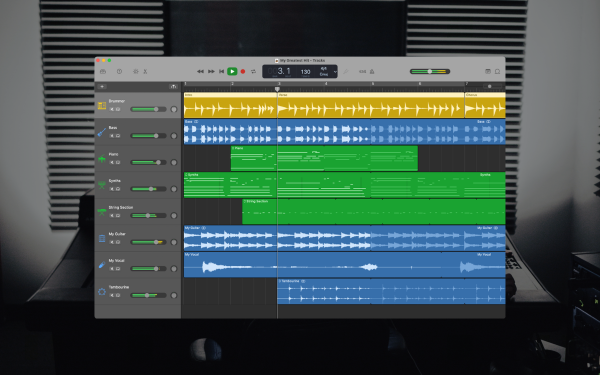
GarageBand, Apple’s free Digital Audio Workstation (DAW), has become popular for many beginner music producers thanks to its user-friendly interface and seamless integration with other Apple products. As an entry-level DAW, GarageBand offers a solid foundation for music production with a range of built-in instruments, loops, and effects that cater to various genres. Its simplicity and accessibility make it an ideal starting point for those looking to dip their toes into music production without feeling overwhelmed.
While GarageBand is a fantastic tool for beginners, it does have some restrictions that may become apparent as users become more experienced. The software lacks advanced features and capabilities in professional-grade DAWs, which could hinder the creative potential of more seasoned producers. Additionally, GarageBand is exclusive to Apple devices, limiting its accessibility to non-Apple platforms.
GarageBand is a solid entry-level DAW that provides an excellent introduction to music production for new producers. Its user-friendly interface, built-in instruments, and integration with the Apple ecosystem make it an appealing choice for those just starting out. However, more experienced producers might find GarageBand’s limitations constraining and may need to explore other, more advanced DAWs as they progress in their music production journey.
FAQs
Here are a few of the most commonly asked questions regarding choosing the right DAW for you and your production needs. Some of these might seem obvious to some producers, but for those looking to get into music production, these answers should shed some light on the common questions of the craft.
What is a DAW?
A Digital Audio Workstation (DAW) is a crucial tool for music producers, allowing them to record, edit, mix, and master audio tracks in a digital environment. DAWs have revolutionized the music production process by providing a comprehensive and versatile platform for creating and manipulating sound and enabling users to work with virtual instruments, effects, and MIDI data. With various DAWs available, each offering unique features and workflows, producers can choose the one that best suits their needs and preferences, ultimately shaping their creative output.
How do I choose a DAW?
As previously mentioned, the ideal DAW for you is the one that enables you to create music with ease, so it’s crucial to test out demos of all the software you’re interested in. Carefully consider your working style and which aspects of the digital audio workstation matter most to you.
DAWs are versatile tools utilized in various stages of music production, including recording, editing, arranging, mixing, and mastering. If possible, try using a demo version to work through this process to evaluate the workflow. If you often struggle and frequently refer to the manual, the software you’re testing might not be the right fit, and it could be time to explore other options.
Before making a purchase, ensure that your chosen DAW is compatible with your computer, any additional hardware you possess, and any plugins vital to your workflow.
Is it hard to learn a DAW?
Learning a DAW isn’t challenging as long as you take your time and use the available tutorial resources. Even if you’re new to music production software, mastering a DAW should be no more difficult than learning any other complex software application.
While some concepts underpinning DAW functionality can be intricate, and certain advanced features may require a deeper understanding of music theory, it’s not essential to grasp these concepts to become proficient in using the software. In truth, you can become an advanced user without diving into the most complex aspects.

Magnetic byline note: This byline is used for staff produced updates and short announcements, often based on press materials and official release information. Editorial responsibility: David Ireland (Editor in Chief) and Will Vance (Managing Editor). About: https://magneticmag.com/about/ Masthead: https://magneticmag.com/masthead/ Contact: https://magneticmag.com/contact/



![How It Was Made: JOKESONYOU & DJ IP – OTTF [Teletech]](https://magneticmag.com/wp-content/uploads/2026/08/artwork-ottf.jpeg)

![How It Was Made: JOKESONYOU & DJ IP – OTTF [Teletech]](https://magneticmag.com/wp-content/uploads/2026/08/artwork-ottf-1024x1024.jpeg)