Pads play a pivotal role in adding depth, emotion, and atmosphere to tracks across every single genre of music. Yet, with an ocean of plugins available, pinpointing the best can be overwhelming. Because with pads specifically, no corners can be cut as thin and lifeless synths can’t handle the complexities and depths you need in the pads and harmony sections of your tracks.
Our curated list of the top five VSTs for making pads will guide you through the finest soundscapes of the year, whether you’re enveloping listeners in cinematic waves or floating them through ethereal, sonic clouds. Dive into our expert selection to find the perfect VST that resonates with your creative spirit and elevates your pad production to celestial heights.
Snag Premium House Music Samples Without Breaking The Bank With Our Massive Curated List Of Warm, Punchy Sounds From Across The Internet. Click Here To Get 4k+ Free Sounds and Samples
Arturia Pigments

The synth’s dual-engine architecture, offering a trio of oscillators per engine, lays a robust foundation for thick, texturally complex pads. The synthesis methods provided—Analog, Wavetable, Sample, and Harmonic—deliver a vast palette of sonic colors. The analog warmth, the morphing capabilities of wavetables, the granular detail from samples, and the precision of additive harmonics converge to create pads that are not just sonically pleasing but emotionally stirring.
Producers can intricately modulate any sound parameter and sculpt evolving harmonic textures that respond dynamically within a track. Adding new wavetables and samples in version 4, alongside the enhanced Unison and filter features—including the aggressive MS20 filter—means harmonies can be as smooth or as biting as required, adding depth and dimension to any production.
Whether for ambient soundscapes or driving electronic beats, Pigments provides an intuitive, expansive toolset for realizing musical ideas with complexity and clarity.
Learn More About This Plugin While Supporting Our Team Of Writers Through Our Affiliate Partnership With Plugin Boutique Here
Serum by Xfer
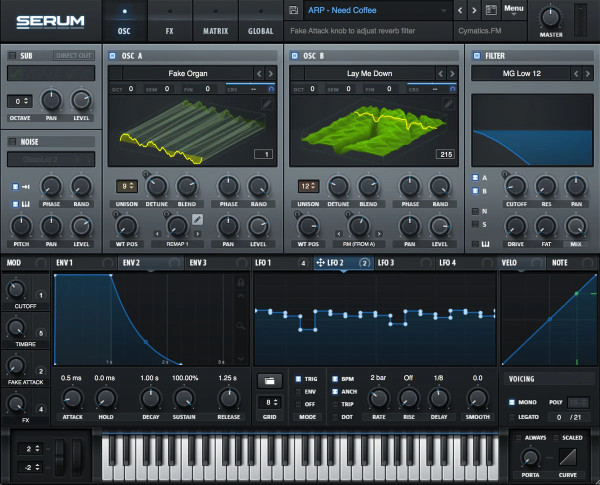
This slick wavetable synth is easy to grasp and sounds fantastic.
It’s loaded with excellent features like morphing oscillators and a wavetable editor, and it’s great for creating some unique pads that toe the line between being digital and precise and warm and analog (TLDR, it’s the best of both worlds). The synth comes with four oscillators, including a versatile noise generator, so there’s a lot you can do with it. It’s user-friendly and compares well with big names like Massive and Sylenth.
The trick with Serum is to layer if with other warmer sounds, like the ones from Omnisphere, which we’ll talk about shortly, to get the punch and power from Serum coupled with the lighter and evolving textures from another synth! With this trick, you can have pro-quality pads, soundscapes, and textures for your productions for years to come.
The only catch? It might be a bit heavy on your computer’s CPU.
Learn More About This Plugin Here
Dune 3
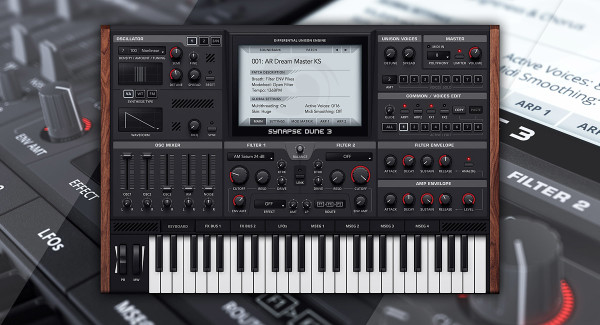
Dune 3 by Synapse Audio is an absolute winner for warmth. It’s known for nailing that perfect filter-modulated sound, and the latest version steps it up with even more versatile filters. The new wavetable editor lets you play with many sound designs, and the modulation matrix gives you many options.
The filters are a big win; they’re warm and almost like hardware, which is rare for a wavetable synth and is essential for creating that sweeping movement in your pads and textures that keep things interesting over time. It might not have the same hype as big names like Serum, but Dune 3 is solid with great oscillators, filters, and effects. Users love it because it just sounds excellent without needing extra plugins.
Learn More About This Plugin Here
Omnisphere by Spectrasonics
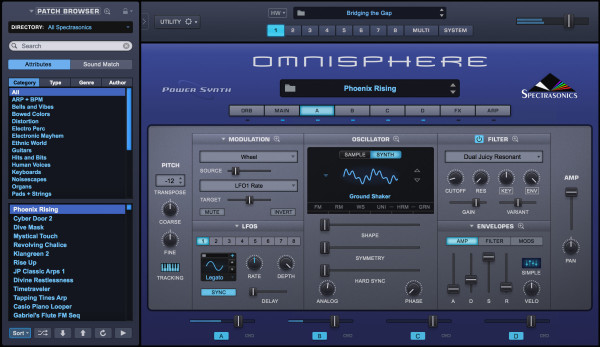
This has been a bit of a game-changer in the synth world.
It excels at creating new sounds and lets you load your samples while hosting a catalog and library of well over 10k sounds. This means you’ll never be without inspiration, starting points, and unique patches for your pads and productions. This many sounds might sound daunting, but Omnipshere’s intuitive filtering and browser menu make at least getting into the ballpark of the sound you need quick and easy, and from there, you can get excited scrolling through the potential sounds you need.
Already Have Omnisphere? Check Out This List Of Free Presets!
The sound quality is impressive, almost like analog synths, and the proper library is incredibly detailed. It’s flexible and unique, offering different synthesis approaches, perfect for good designers in film, TV, gaming, and music projects. It’s a bit pricey, but totally worth it for the quality and features it packs, making it the desert-island plugin of many producers over the past decade.
Learn More About This Plugin Here
Diva

U-he’s Diva is a standout synth. It’s architecturally straightforward but sounds fantastic, bridging the gap between analog and digital sounds. Considered one of the best virtual analog (and even digital) synth VST plugins around, Diva is known for its excellent sound, great presets, and simple interface. Dive captures the essence of analog hardware, making it suitable for a wide range of genres without losing the ease of use of virtual instruments, allowing producers to create pads and soundscapes that harken back to the original timbres that shaped the history of electronic music production but in an entirely new and exciting way.
We Have A Few Dope Freebies For This Synth Too
Diva’s attention to detail in its design sets it apart, separating it from other virtual synths. It’s not just about looking good; Diva is about sounding incredible. Its highly responsive oscillators offer a range of intense and dynamic tones, making it a powerful and versatile synthesizer. Its multiple modulation points allow you to create soaring and evolving pads without having to stack a ton of synths and samples together to get the job done.
The only downside?
It’s quite CPU-hungry, but that seems a small price to pay for the quality of sound and flexibility it offers. Luckily, there are a handful of different quality modes that you can set, one of them being ‘Draft’ mode, which severely reduces the CPU load of the plugin in exchange for mildly less sonic quality from the softsynth.
Learn More About This Plugin Here